Vetting Vault
 -/5
-/5
-/5
-/5
-/5
-/5
About Vetting Vault Data Rooms
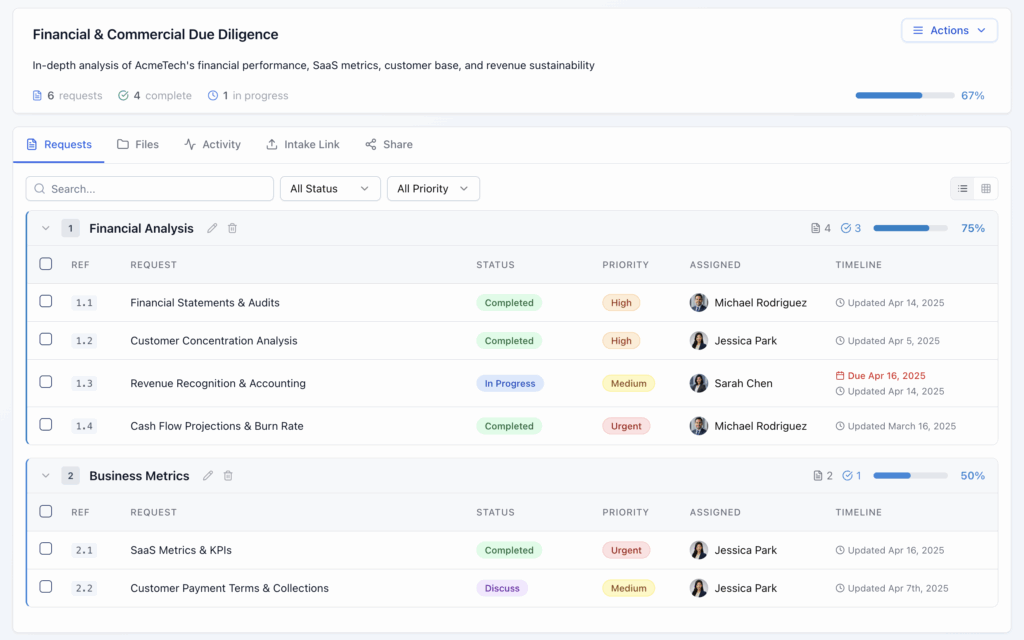
Vetting Vault is a cloud-based due-diligence and deal-orchestration platform positioned as an alternative to the traditional folder-based virtual data room. Rather than storing files in generic folders, Vetting Vault structures a deal around a due-diligence request list: every document a buyer or lender asks for is tied to a specific, trackable request, and an “AI” layer (branded “Deal AI” on its site) reads uploaded documents such as P&Ls, bank statements, tax returns, and letters of intent to answer cross-document questions with cited sources. Sellers or borrowers can respond to requests through a link without creating an account, and the platform’s pricing is built around a “one admin pays” model, meaning the deal creator is billed while any number of buyers, sellers, lawyers, or accountants can join a deal for free.
What is Vetting Vault used for?
Vetting Vault is used to run buy-side and sell-side due diligence on small and mid-market M&A deals, letting an advisor or acquirer send a structured request list to a seller and track, in real time, which items have been uploaded, which are outstanding, and which need follow-up. Commercial lenders and banks use the same request-tracking model for loan and credit due diligence, sending borrowers a checklist of financial documents to upload without requiring the borrower to create an account or learn a new platform. Law firms and accounting firms supporting a deal use it as a shared workspace for document Q&A, with a threaded chat and question-and-answer module tied to specific requests rather than a general inbox. Because no independent case study or named customer could be verified, these use cases reflect the vendor’s own stated positioning rather than confirmed third-party deployments.
Alternatives to consider




Document security features
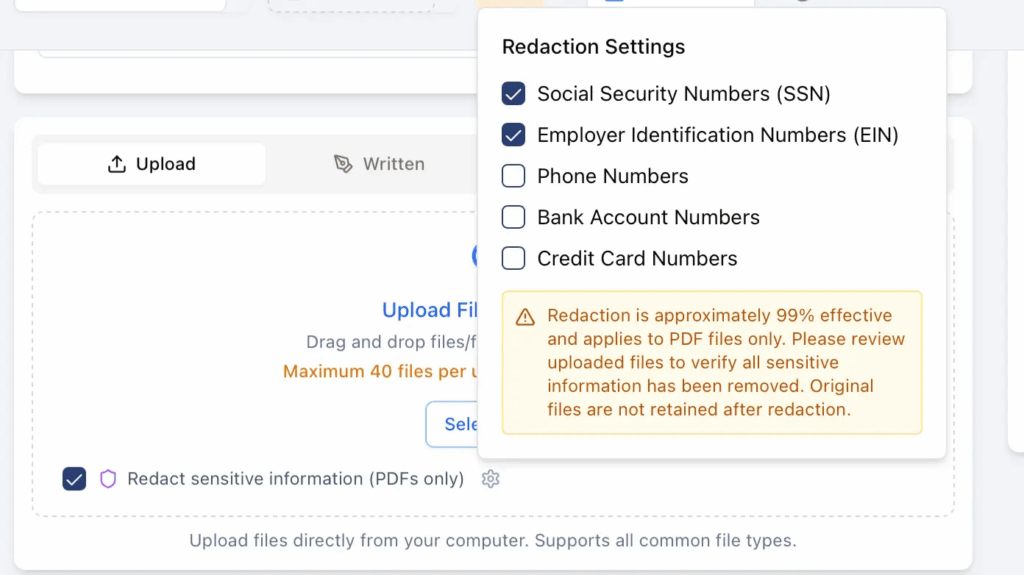
Vetting Vault’s security claims, per its own site, include watermarking every downloaded document with the recipient’s email address, IP address, and a timestamp; role-based access control at the deal, folder, and document level; mandatory e-signature NDAs with templates and an audit trail before a collaborator can access a deal; automatic detection and redaction of personally identifiable information such as Social Security numbers, EINs, and bank account numbers during upload; and two-factor authentication with session-timeout controls. Data is encrypted with AES-256 at rest and in transit, per the vendor, with SSL/TLS used for file transfer and malware scanning on uploads. A dedicated view-only or download-blocking mode was not described on the vendor’s public pages, so document security here leans more on watermarking, redaction, and audit logging than on hard DRM-style restrictions.
On certifications, a SOC 2 compliance claim appears once, in FAQ copy on the vendor’s comparison page, but is not repeated or substantiated with an auditor name, report, or trust badge on the dedicated security page, which lists encryption and access controls but does not mention SOC 2. Given that inconsistency, SOC 2 compliance should be treated as an unverified vendor claim rather than a confirmed certification, and should be confirmed directly with Vetting Vault before being relied on. No ISO 27001, GDPR, or HIPAA compliance claims were found anywhere on the site.
Collaboration and document management features
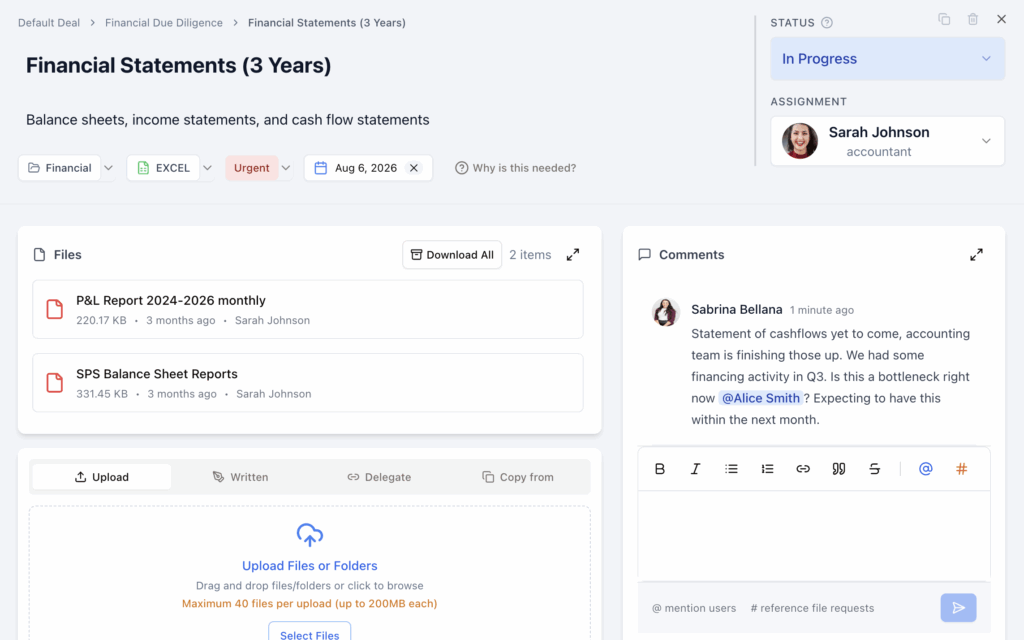
Collaboration. A Deal Chat module supports @mentions and threaded replies, alongside a Q&A tool that lets participants categorize and prioritize questions, assign them to specific people, and generate a PDF export of questions and answers for the deal file. A global search function is meant to let users search across requests, uploaded files, and chat history from one place.
Document management. Uploads use drag-and-drop with inline preview and automatic file versioning when a document is replaced. Vetting Vault also advertises reusable deal templates for advisors running similar diligence processes repeatedly, bulk file actions, and CSV export of deal data. The vendor claims its AI can import an existing Excel or Word diligence checklist and set up a new deal request list from it in under ten minutes, though this has not been independently benchmarked.
User experience
Because Vetting Vault has no presence on G2, Capterra, Software Advice, or GetApp, there is no independent user-review data available to describe real-world usability or day-to-day friction points. The only user-facing quote available is a single, unattributed testimonial published on Vetting Vault’s own homepage from an “M&A Advisor, Small Business Acquisitions,” describing time saved chasing documents from a non-technical seller; since it is vendor-selected and not independently verifiable, it should be read as marketing copy rather than a representative review.
Integrations and compatibility
1. Google Drive, Dropbox, Box, and OneDrive. Vetting Vault syncs uploaded deal documents with these four cloud storage providers, which would let, for example, a corporate development team keep a live copy of diligence files in the storage system its finance team already uses.
2. Claude, ChatGPT, and Grok (via Model Context Protocol). Vetting Vault exposes an MCP server so a deal team can query documents inside a deal directly from their own AI assistant of choice, which an M&A advisor might use to ask cross-deal questions without switching applications.
No CRM, e-signature platform beyond Vetting Vault’s own built-in NDA signing, or accounting-software integrations are advertised. Prospective buyers who need the platform to connect to a broader deal-sourcing or CRM stack should confirm current integration support directly with the vendor.
Customer support
Vetting Vault lists email support, a documentation hub at vettingvault.com/docs, and phone support at 737-377-0009, Monday through Friday, 9 a.m. to 6 p.m. Eastern, described as intended for urgent issues. The vendor states a typical response time of within 24 hours, with faster “priority support” reserved for paid subscribers. Video tutorials are listed on the vendor’s own support page as “coming soon” and were not yet available as of this review, and there is no stated 24/7 support option.
Additional features
Vetting Vault’s most distinctive feature is that the request list, not a folder tree, is the organizing structure of the data room: every document is attached to a specific ask with its own status, rather than being dropped into a generic folder hierarchy, which is a genuinely different model from the file-storage approach used by most VDRs on this site. Its “one admin pays, unlimited collaborators” pricing is also a real point of difference from seat-based competitors like CapLinked, letting a deal with many outside participants (sellers, co-investors, multiple law firms) join without per-seat charges.
Vetting Vault pros & cons
Because Vetting Vault has no reviews on G2, Capterra, Software Advice, or GetApp, there is no independent user feedback to draw balanced pros and cons from, and this section is shortened accordingly rather than filled with vendor marketing claims presented as user sentiment.
Verifiable pros
- Request-based structure and free unlimited collaborators are a genuine departure from typical seat-priced or folder-based VDRs
- Single, publicly listed price ($199/month) rather than a mandatory sales call
- Native iOS and Android apps, which not all comparably priced competitors offer
Verifiable cautions
- No independent reviews on any major software review platform as of this writing, so usability and support quality cannot be externally verified
- SOC 2 compliance is claimed inconsistently (once in marketing FAQ copy, not on the dedicated security page) and should be confirmed directly with the vendor
- No ISO 27001, GDPR, or HIPAA compliance claims are made
- Only one plan is publicly offered; buyers with needs outside that single tier will need to contact the vendor directly since no enterprise pricing is published
Pricing plans
Vetting Vault publishes a single plan rather than multiple tiers: $199 per month, discounted for annual billing (advertised as roughly a third off the monthly rate). The plan includes unlimited users and unlimited deals, with only the deal-creating admin billed; buyers, sellers, lawyers, and other collaborators join at no additional cost. No separate enterprise or custom-quoted tier is published on the vendor’s site, which is a departure from most competitors in this category that gate their higher tiers behind a sales conversation.