Nov 26 ‘25
20 min read
No time to read? Get a quick AI summary
For years, professionals used Dropbox and DocSend for different reasons. Dropbox data room helped teams stay organized and collaborate on files internally. DocSend, on the other hand, gave dealmakers and executives the power to share documents securely and track engagement with data.
When Dropbox acquired DocSend in 2021, these two worlds came together. What began as separate tools for storage and sharing has evolved into a single, connected ecosystem that supports the full document lifecycle, from creation and collaboration to tracking and e-signatures.
In this article, you will explore:
- How Dropbox and DocSend originally served different purposes and what changed after the 2021 acquisition
- How the unified Dropbox-DocSend ecosystem combines storage, secure sharing, and e-signatures
- Key features, use cases across industries, and the platform’s pros and cons
- Alternatives like Ideals for high-security, deal-focused document management
1. Before the merger: Two solutions, two purposes
Dropbox
Founded in 2007 and headquartered in San Francisco, Dropbox data room quickly became a global leader in cloud storage and file synchronization. Its mission: to provide “one organized place for content, and all the collaboration around it.”
DocSend
Founded in 2013, also in San Francisco, DocSend data room was created to fix a common business problem – sending sensitive files into a “black hole” with no insight into what happened after hitting send. DocSend’s founders built a secure document-sharing tool layered with analytics to give business leaders visibility and control.
2. The turning point: Dropbox acquires DocSend
The relationship between the two companies started in 2019, when DocSend became a Dropbox extension partner, integrating its secure sharing capabilities into Dropbox workflows. Recognizing their shared vision for simple, secure, and scalable collaboration, Dropbox acquired DocSend in March 2021 for $165 million.
Dropbox Co-Founder and CEO Drew Houston described the move as a natural evolution for the company:
“Given the dramatic rise in remote work, there’s increased demand for digital tools that help people organize their content and seamlessly collaborate. DocSend is a perfect complement to our product roadmap, and we’re thrilled to welcome them to our team. By bringing Dropbox, HelloSign, and DocSend together, we’ll be able to offer a full suite of secure, self-serve products to help them manage critical document workflows from start to finish.”
For Russ Heddleston, DocSend’s Co-Founder and CEO, the acquisition was an opportunity to scale the company’s original mission:
“Our roots are in helping startups navigate the fundraising process and empowering entrepreneurs to chase their dreams by giving them more visibility and control over the pitch process. As we’ve grown, we’ve realized that the ability to securely share content and engage with documents after they are sent offers powerful benefits to a variety of customer segments. By joining Dropbox, we’ll be able to rapidly scale, bringing our vision and capabilities to the hundreds of millions of people around the world who already trust Dropbox with their most important content.”
This move brought together three powerful tools. Dropbox (storage), DocSend (secure sharing), and HelloSign (signatures) created a seamless document workflow from first draft to final contract.
Additional resources: Check out our next comparison, ShareFile vs Dropbox, to see how they differ in security, workflow control, and usability.
3. From two tools to one ecosystem
Over time, DocSend has shifted from a standalone platform for deal execution to a key layer in Dropbox’s all-in-one document ecosystem. What used to require three separate tools is now available in a unified environment that blends file storage, document analytics, and e-signatures. Now, users can do the following:
- Store and organize content in Dropbox
- Share and track documents through DocSend
- Complete e-signatures with HelloSign
Thus, teams can collaborate internally and securely engage with external parties.
DocSend vs Dropbox comparison: Core differences and acquisition impact
| Docsend vs Dropbox comparison category | DocSend | Dropbox | Integration impact |
| 1. Core focus and identity | Purpose-built for secure deal workflows – fundraising, investor relations, M&A, etc. | General cloud storage and collaboration platform. | Shift from a niche deal execution tool to a broad productivity suite. |
| 2. Access control and security model | Permissions on the level of DocSend links, viewer whitelisting, NDAs, and watermarking. | Broader encryption and compliance stack (AES-256, HIPAA, ransomware protection). | Security focus moved from dealroom-style precision (“who can see what”) to enterprise-grade protection (“how securely it’s stored”). |
| 3. Third-party integrations | Dropbox, Gmail, Outlook, Salesforce, email productivity tools, Zapier, IFTTT | Google Workspace, Microsoft, Adobe, HubSpot, Autodesk, Canva, AWS | Shift from deal-specific integrations to a broad enterprise and creative ecosystem, blending external sharing with cross-team collaboration. |
| 4. Target users and use cases | Fundraising, VC, M&A, board communications — users sharing confidential deal materials. | Creative teams, marketing, IT, HR, and general cloud collaboration. | Audience expanded, but DocSend’s specialized investor/dealroom use cases are no longer the core. |
Dropbox’s integration of DocSend broadened its reach and infrastructure, but also diluted DocSend’s identity as a purpose-built deal execution platform. What was once a niche tool for secure investor workflows is now part of a general productivity ecosystem.
What the new Dropbox experience offers for different business needs
The table below breaks down the core data room features, organized by category, so you can quickly understand how the platform supports productivity, collaboration, security, and compliance.
| Features | Capabilities | Description |
| 1. Search and knowledge management |
🔸 Search across apps |
🔸 Find files, images, and videos fast using AI-powered universal search |
|
🔸 Summarize documents |
🔸 Pull content insights and provide concise, actionable answers |
|
| Organization and workflow |
🔸 Centralize work |
🔸 Access schedules, documents, and team activities in one unified feed |
|
🔸 Organize shared folders |
🔸 Coordinate projects, track file updates, and assign tasks to team members |
|
|
🔸 Manage groups |
🔸 Create member lists to control access and collaboration |
|
| File storage and sync |
🔸 Store files and folders |
🔸 Save any type of content securely, including CAD, PowerPoint, images, and videos |
|
🔸 File sync across devices |
🔸 Access files in real time from desktop, mobile, and web platforms |
|
|
🔸 Recover files |
🔸 Restore deleted files or previous versions (30–180 days depending on plan) |
|
|
🔸 Rewind or backup content |
🔸 Restore folders, accounts, and connected devices after accidents or ransomware |
|
| File sharing and collaboration |
🔸 Share files quickly |
🔸 Send large files via context-rich links without needing a recipient account |
|
🔸 Track updates |
🔸 Receive notifications when shared files are edited, moved, or renamed |
|
|
🔸 Control shared access |
🔸 Set passwords, expiration dates, download restrictions, and folder permissions |
|
| Access control and permissions |
🔸 Monitor access risks |
🔸 Identify stale links or risky permissions and fix them efficiently |
|
🔸 Set granular permissions |
🔸 Grant selective access to specific subfolders |
|
|
🔸 Manage sharing controls |
🔸 Revoke links, set view-only access, and apply security policies |
|
| Security and protection |
🔸 Protect devices and data |
🔸 Use remote wipe and encrypted cloud storage to safeguard content |
|
🔸 Enforce account security |
🔸 Enable two-factor authentication and manage devices centrally |
|
|
🔸 Encrypt files |
🔸 Apply AES-256 encryption and SSL/TLS for data at rest and in transit |
|
|
🔸 Monitor threats |
🔸 Detect ransomware, monitor the dark web, and receive breach alerts |
|
| Recovery and continuity |
🔸 Restore content |
🔸 Recover deleted files, folders, and previous versions quickly |
|
🔸 Maintain version control |
🔸 Roll back files to earlier states without creating duplicates |
|
| 8. Compliance and governance |
🔸 Ensure compliance |
🔸 Meet GDPR, HIPAA, SOC 1/2/3 standards with reporting and audits |
|
🔸 Classify sensitive data |
🔸 Automatically track and report confidential information |
|
|
🔸 Implement governance policies |
🔸 Use add-ons to manage corporate data and reduce compliance risks |
These features create a single, integrated workspace that empowers teams to store, share, collaborate, and protect their documents with confidence.
💡Additional resources: Take a closer look at Box vs Dropbox to see which solution best fits your team’s collaboration, security, and workflow needs.
Who uses Dropbox today?
Dropbox now serves a wide range of industries, helping teams stay organized, collaborate efficiently, and secure critical content. Key use cases include the following:
1. Construction:
- Provide all project stakeholders with a single source of truth
- Ensure access to the latest documents and media across devices
- Sign agreements digitally
2. Technology and creative teams:
- Merge design, engineering, and development workflows in one tool
- Collaborate across devices, removing version confusion
- Protect intellectual property with enterprise-grade security
3. Manufacturing:
- Centralize all project files, contracts, and admin documents
- Backup data with encryption, advanced permissions, and ransomware detection
- Streamline approvals and contracts with integrated eSignatures
4. Media and entertainment:
- Collaborate remotely in real time and mark offline files for review
- Optimize video feedback and audio/video project sign-off with Dropbox Replay
5. Professional services:
- Deliver client presentations with custom branding
- Manage shared files securely
- Collect legally-binding eSignatures efficiently
6. Education and research:
- Manage users, monitor activity, and control sharing permissions
- Safeguard sensitive research and institutional data with advanced security
- Accelerate collaboration with cross-device sync and integration with LMS and communication tools
- Speed up workflows for admissions, HR, and facilities with Dropbox Sign
Dropbox’s platform now supports organizations of all sizes, offering secure file storage, collaboration, and workflow management across industries.
Dropbox DocSend review: Pros and cons
Based on real user reviews from G2, Dropbox + DocSend receives high marks for usability and collaboration. However, users also note limitations around cost, storage, and file recovery. The list below summarizes the most frequently mentioned pros and cons.
| ✅Pros: | ❌Cons: |
|---|---|
| Ease of use of the interface Seamless file sharing and collaboration Convenient access to files from anywhere Quick document sharing Cross-platform accessibility | High pricing compared to alternatives Limited storage, especially on free plans Syncing issues with large folders Short file recovery windows Restrictive free storage impacting the workflow |
Alternatives to DocSend and Dropbox
While Dropbox and DocSend now form a unified ecosystem, some businesses may need data room platforms with stronger security, more advanced compliance features, and specialized deal-room capabilities. One such alternative is Ideals.
What is Ideals?
Ideals is a secure virtual data room trusted by over 1 million professionals worldwide, including investment bankers, advisors, real estate experts, and public institutions. Since 2008, the provider has transformed the VDR market by delivering an effortless experience with transparent pricing, an intuitive interface, and the fastest customer response.
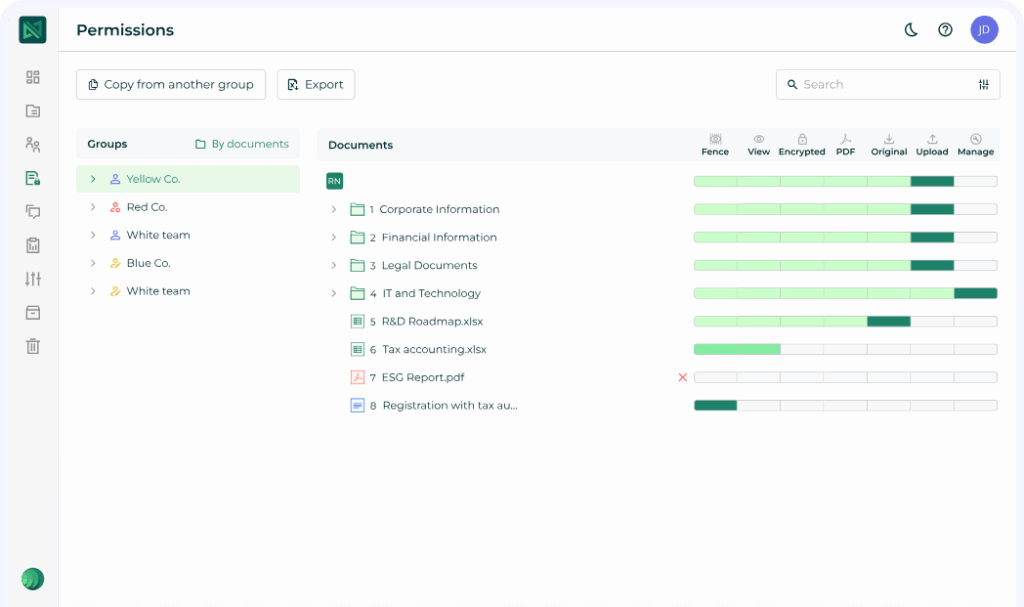
What are the top Ideals features?
- 8 levels of access controls
- Granular user permissions
- AI-powered redaction (21 file formats)
- Fence View for screenshot prevention
- Custom session timeouts
- DWG, EML, MSG support
- A detailed audit trail with engagement analytics
- Advanced Q&A with auto-assignment
- M&A due diligence checklist
- Multi-project management
- Multilingual interface (15 languages)
- Auto data indexing
- Upload from external storage
- 30-second tech support response
Combining advanced deal-making tools with robust document security, Ideals helps businesses close transactions faster and with confidence. Its top priority is to listen to customers and deliver a frictionless experience, accelerating deals while maintaining the highest security standards and unmatched 24/7 support across industries from renewables to life sciences.
The table below provides more details on the advantages of Ideals over Dropbox.
Compare Ideals, Intralinks, and Datasite VDRs
Features



User feedback
4.7
4
4
Ease of use
4.7
4.5
4.5
Ease of setup
4.7
4.5
4.5
Value for money
4.6
4.3
4.1
Customer care
4.8
4.3
4.2
Pros/cons
- 24/7 chat support
- 30-second response time
- 8 levels of access
- 25+ file formats
- 15 languages support
- Search with OCR
- Advanced Q&A module
- No
- 24/7 chat support
- Activity tracking
- Commenting
- Role-based permissions
- Reporting
- Compliance management
- User-friendly interface
- Document analytics and tracking
- Affordable entry-level pricing
- Limited advanced security features
- No dedicated account manager
- Expensive Data Rooms plan
- Missing OCR and multilingual support
Pricing range
Drag & drop upload
Personal manager
Bulk user invitation
Search with OCR
Auto-indexing
Multilingual access
Activity reports
Detailed audit trail
Activity notifications
Verdict: Dropbox and DocSend vs. Ideals data rooms
The integrated Dropbox-DocSend ecosystem is a versatile solution for organizing, collaborating on, and securely sharing documents across teams. It works well for general business workflows, internal collaboration, and light external sharing.
For highly sensitive deals, complex transactions, or multi-party due diligence, Ideals offers superior security, advanced deal-focused tools, ease of use, and excellent technical support..
In short: choose Dropbox with DocSend for broad collaboration and convenience, and Ideals for secure, deal-centric document management.
Key takeaways
- Dropbox and DocSend now function as a unified ecosystem, providing a single platform for content organization, secure sharing, and e-signatures. The integrated suite is well-suited for internal collaboration, supporting general business teams, creative workflows, and remote work needs.
- While versatile, Dropbox and DocSend may not fully meet the strictest security, compliance, or complex transaction requirements.
- Ideals offers advanced security features for high-stakes transactions, including granular access controls, AI-powered redaction, detailed audit trails, and M&A-specific tools.
Dropbox + DocSend space is a strong choice, but it’s better to rely on Ideals when security, compliance, and deal-focused functionality are priorities.